
Practical team guide · Free to use
A client handoff checklist for small service teams.
A client asks for a change. Someone needs to act, but the next person needs more than a forwarded message. Use this checklist to make the request, responsibility and next decision clear.
It fits a salon appointment change, a studio preparation request or another service-team handoff. Use it on paper or in your existing tools. No BrightHub account is needed.
Go to the printable worksheetMake the next action clear
Six checks before you hand work over.
Capture the request and the latest agreement.
Write what the client wants, when they asked and any important constraint. Separate a request from an agreed change: “Would prefer Friday afternoon” is different from “Confirmed Friday at 2.” Link to the relevant record instead of copying an entire conversation.
Name one concrete next action.
Start with a verb: check the available times, ask the client to choose, or send the preparation details. Avoid a broad instruction such as “sort out the appointment.” Include what must be true before someone can call this action finished.
Give that action one owner and a due date.
Choose the person accountable for doing it, even if someone else will help. Make the due date fit the client's deadline. If the action needs to happen at a particular time, write the time and time zone in the instruction. A due date alone is not a promise to the client.
Check dependencies before making a commitment.
For a booking change, review saved staff hours and the relevant appointment, service and room constraints. For preparation work, check which information or material is still missing. If you are waiting on another person, say what you need and when the owner will check again.
Confirm that the receiving person has accepted it.
Use your team's normal channel to confirm who is taking over and where the latest details are kept. A copied note or an assigned item is not proof that the person has seen it. If ownership changes, update the task and tell the previous owner so two people do not act on conflicting instructions.
Record the result and choose any next step.
After the action is done, record the outcome in the appropriate client or appointment record and mark the task complete. If a different action is still needed, create a separate follow-up with its own owner and date. Do not close the whole request just because one message was sent.
Worked example · Fictional people and business
Riley needs a different appointment time.
On Tuesday morning, Riley asks Harbor Studio to move a Friday visit to the afternoon. The original appointment is still in place. Alex records the request; Jordan will handle the reply. Here is a handoff that gives Jordan enough context to act.
- Request and current agreement
- Riley prefers Friday after 1 PM. No new time is confirmed. Keep the existing booking until a replacement is agreed.
- Next action
- Check staff hours and appointment constraints, then offer Riley suitable times through the studio's usual messaging channel.
- Owner and deadline
- Jordan. Reply by Tuesday at 3 PM, studio local time.
- Waiting on / next check
- Riley's choice after the options are sent. Jordan checks for a reply on Wednesday morning.
- Done when
- The agreed time is recorded in Calendar and the confirmation has been sent. If no option works, record that outcome and agree the next action.
- Handoff confirmation
- Jordan confirms taking responsibility. Alex points Jordan to the current client note and appointment.
If the client has not replied
Keep the request visible and choose a check-in date. Do not quietly move the booking or repeatedly change its deadline without recording why. If a time option can no longer be held, check availability again before offering it.
Once Riley agrees, Jordan updates the booking and sends the confirmation. If preparation details are a separate action, that becomes its own task. The message, appointment change and task completion are actions the team takes; the checklist does not perform them.
Print or copy into your own document
Client handoff worksheet
Use your browser's Print command to print only this blank worksheet. Write on the printed copy, or copy the field names into your existing notes. This page has no data-entry or saving function.
BrightHub · getbrighthub.com/guides/client-handoff-checklist
Client or request reference
Date / prepared by
What changed? What is already agreed?
Next action and where the current details are kept
One owner
Due date / time and time zone if needed
Dependencies or missing information / next check date
This action is done when...
Receiving owner confirmed / date
Outcome / next follow-up
Context checked Owner confirmed Deadline clear Result recorded
Use a reference rather than unnecessary personal details. Keep the completed worksheet with your team's appropriate records.
If your team uses BrightHub
Keep the handoff beside the work.
Keep relevant context in the client's notes. In Tasks, create the next action, choose an assignee and set a due date. Open More details (optional) and use Notes for the completion rule and any timing instructions. Review saved staff availability and Calendar before agreeing an appointment change.
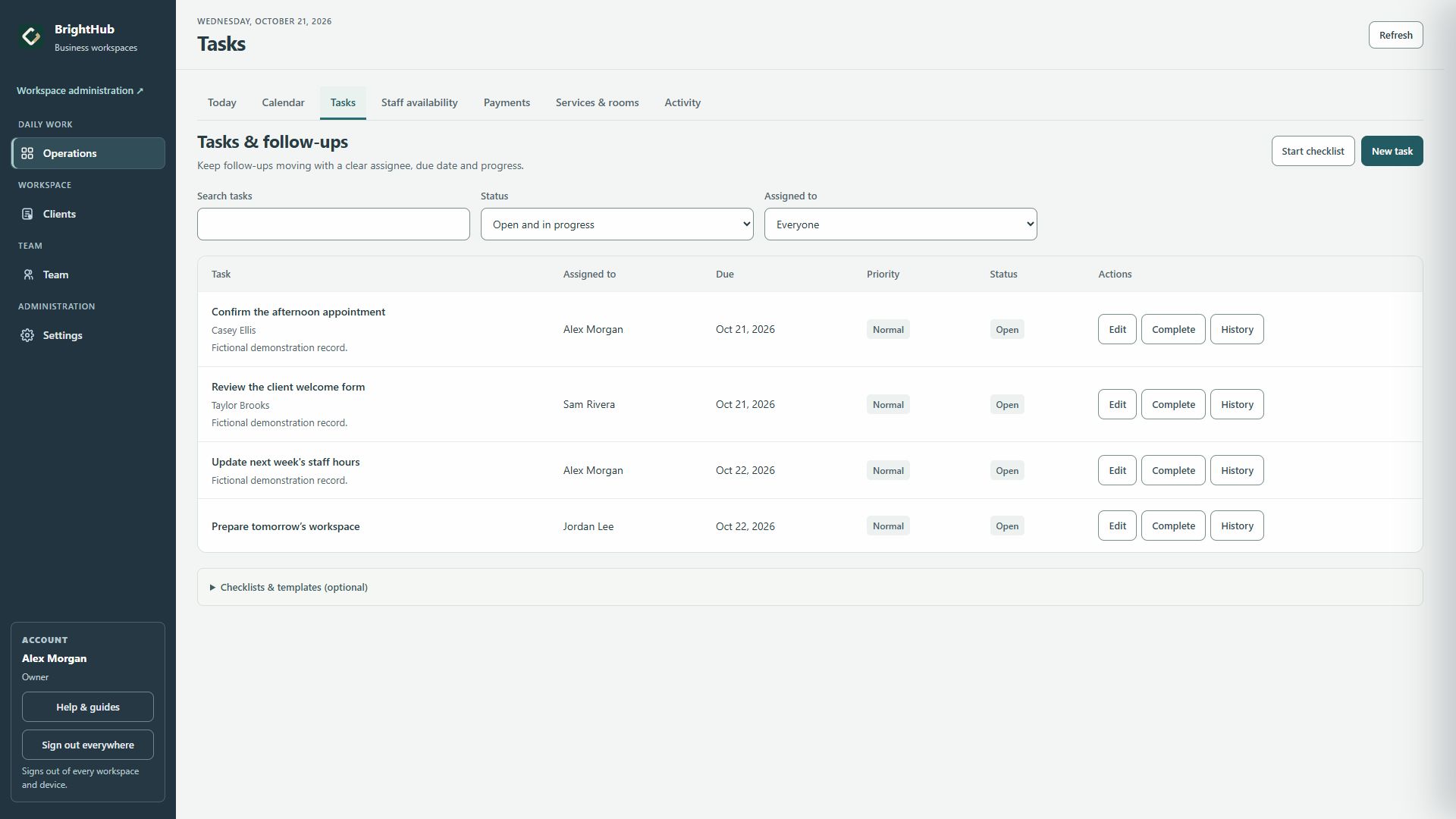
After doing the work, update the relevant client or appointment record and complete the task. Create another task if the request needs a separate follow-up. Your team sends messages through its usual channel.
Keep the work visible
Review the handoffs that are still open.
The weekly open-work review helps your team decide what to finish, what is waiting and what needs a new owner or date. It includes another blank worksheet.
Ready to use the product? Create a BrightHub workspace, or explore the public tour first.