
Practical team guide · Free to use
A weekly review of open client work.
An unfinished task needs a decision, not just another week on the list. Review what is overdue, what is waiting and what is coming next, then leave each item with a clear action, owner and date.
Bring your open task list, relevant client requests, appointment calendar and saved staff hours. The method works on paper, in a shared document or in BrightHub. No signup is needed for this guide.
Go to the printable worksheetPrepare a decision, not a status recital
A repeatable review agenda.
Choose a regular point in the week and name someone to keep the decisions together. Before the review, ask each task owner to update completed work and flag anything blocked. Keep urgent client issues moving when they arise; they do not need to wait for the weekly review.
Close work that is actually finished.
Check the result before marking an item complete. If “send time options” is done but “confirm the new visit” is not, those are different actions. Record the completed action and give the outstanding one its own owner and date. If an action is no longer needed, record why rather than leaving it as open work.
Decide what to do with overdue work.
Ask what prevented completion and whether the action is still needed. Choose to finish it, narrow its scope, reassign it or stop it because the request changed. If you change the date, record the reason and check that the new date is realistic. Moving every deadline forward does not resolve the underlying problem.
Separate waiting from active work.
For an item waiting on a client, teammate or supplier, write exactly what is missing. Keep a person responsible for the next check and choose a check-in date. “Waiting” describes the situation; it does not remove ownership. Avoid promising a client a time before the needed confirmation arrives.
Look ahead at upcoming preparation.
Review the next set of appointments and commitments your team needs to prepare for. Check saved staff hours before assigning time-sensitive work. Capture missing preparation as specific tasks, such as “Review the visit instructions,” instead of one broad “Prepare for next week” item.
Read back the next actions.
Each remaining item should have an action, one owner, a due date or next-check date, and a clear completion condition. Confirm ownership changes with the people involved. Put the decision in the record the team will use during the week, rather than keeping a separate meeting list that becomes stale.
Worked example · Fictional people and business
Three open items, three different decisions.
Harbor Studio is reviewing its work on Monday. The team avoids treating every unfinished item as the same kind of delay.
Overdue
Preparation details have not been sent.
Situation: Alex was due to send Thursday's preparation details on Friday. The wording was still waiting for manager review.
Decision: Sam reviews the wording by Monday noon. Alex sends the agreed details by 2 PM, studio local time. Record the dependency instead of silently changing Friday's deadline.
Done when: The agreed details have been sent and that action is recorded. This does not prove the client has read them.
Waiting
A client has not chosen a new visit time.
Situation: Jordan sent Riley two options. No new appointment time is confirmed.
Decision: Jordan checks for a reply Tuesday morning and reviews availability again before offering any expired option. Keep the original booking until a replacement is agreed.
Done when: The agreed outcome is recorded. A sent message alone does not close the appointment-change request.
Upcoming
Wednesday's visit needs preparation.
Situation: The appointment is confirmed, but nobody has taken responsibility for checking the preparation notes.
Decision: After checking saved staff hours, Maya accepts the review task, due Tuesday afternoon. Any missing detail becomes a separate question with an owner.
Done when: The relevant notes are reviewed and any missing information has a clear next action.
When to split an item
Split work when the next step has a different owner, depends on a different confirmation or has a separate deadline. Keep one task when it is still the same action and owner. The aim is to make responsibility understandable, not to create more entries.
Print or copy into your own document
Weekly open-work review worksheet
Use your browser's Print command to print only this blank worksheet. Write on the printed copy, or copy the fields into your existing notes. This page has no data-entry or saving function.
BrightHub · getbrighthub.com/guides/weekly-work-review
For each item: what is the next action, who owns it, when is it due or checked again, and what will count as done?
Item 1 / client or request reference
Overdue Waiting Upcoming
Decision / next action / dependency
Owner / due or next-check date
Done when / reason for a changed date
Item 2 / client or request reference
Overdue Waiting Upcoming
Decision / next action / dependency
Owner / due or next-check date
Done when / reason for a changed date
Completed or no longer needed / result or reason recorded
Decisions recorded Owners confirmed Dates checked
Use additional copies for more items. Keep unnecessary personal details out of the review sheet.
If your team uses BrightHub
Review the next steps in Tasks.
Open Tasks and review the work, assignees and due dates together. Use client notes for relevant context and review Calendar and Staff availability before committing to preparation deadlines.
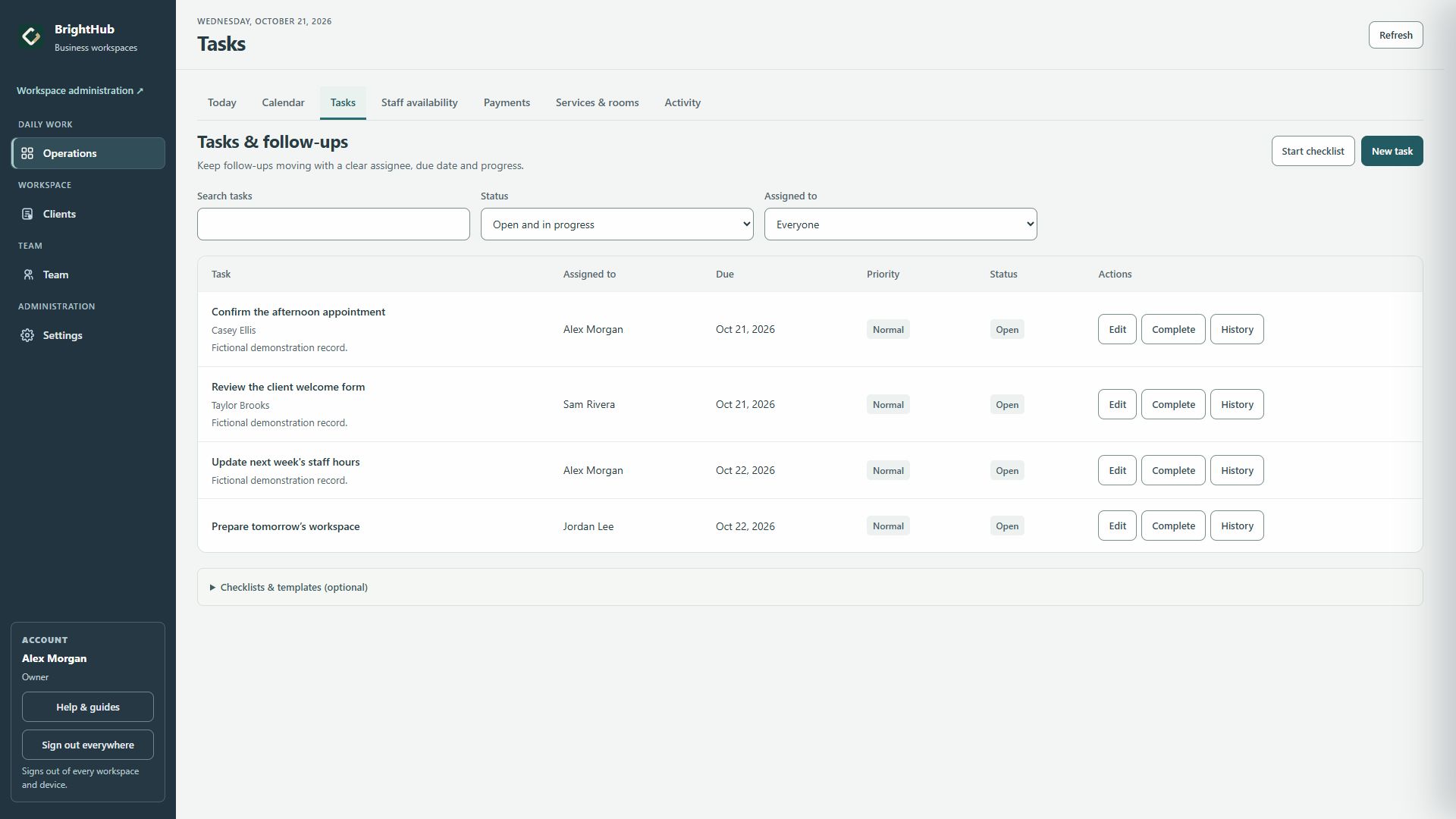
Update a task when its action or deadline changes, and complete it after the work is done. Create a separate follow-up when another action needs its own owner or date. Your team confirms ownership and sends any client messages through its usual channel.
Make the next handoff clearer
Give the next person enough context to act.
Use the client handoff checklist when a request moves to another teammate. It includes a worked appointment-change example and a blank worksheet.
Ready to use the product? Create a BrightHub workspace, or explore the public tour first.